Billing & Pricing
Configure pricing, payment structure, and billing notifications for your membership plans. The Billing & Pricing settings determine how much members pay, when they pay, and how they're notified about subscription renewals.
Quick start
Access and manage billing & pricing settings in just a few steps:
- Navigate to Memberships > Membership Plans in your dashboard sidebar
- Locate the plan you want to configure
- Click it's View Detail button in the Actions column
- Observe to the Billing & Pricing section on the Details tab
- Click Edit to modify pricing and notification settings
What you can do
The Billing & Pricing section helps you:
- View pricing details — See the price, payment type, and plan duration at a glance
- Edit price amounts — Update pricing as your business needs change
- Configure renewal notifications — Control when members receive expiration reminders
- Review pricing summaries — See total costs displayed in plain language
- Understand payment impact — Know how changes affect existing and new members
Understanding the interface
The Billing & Pricing section appears on the Details tab of each membership plan's detail page, typically on the side of General Information section.
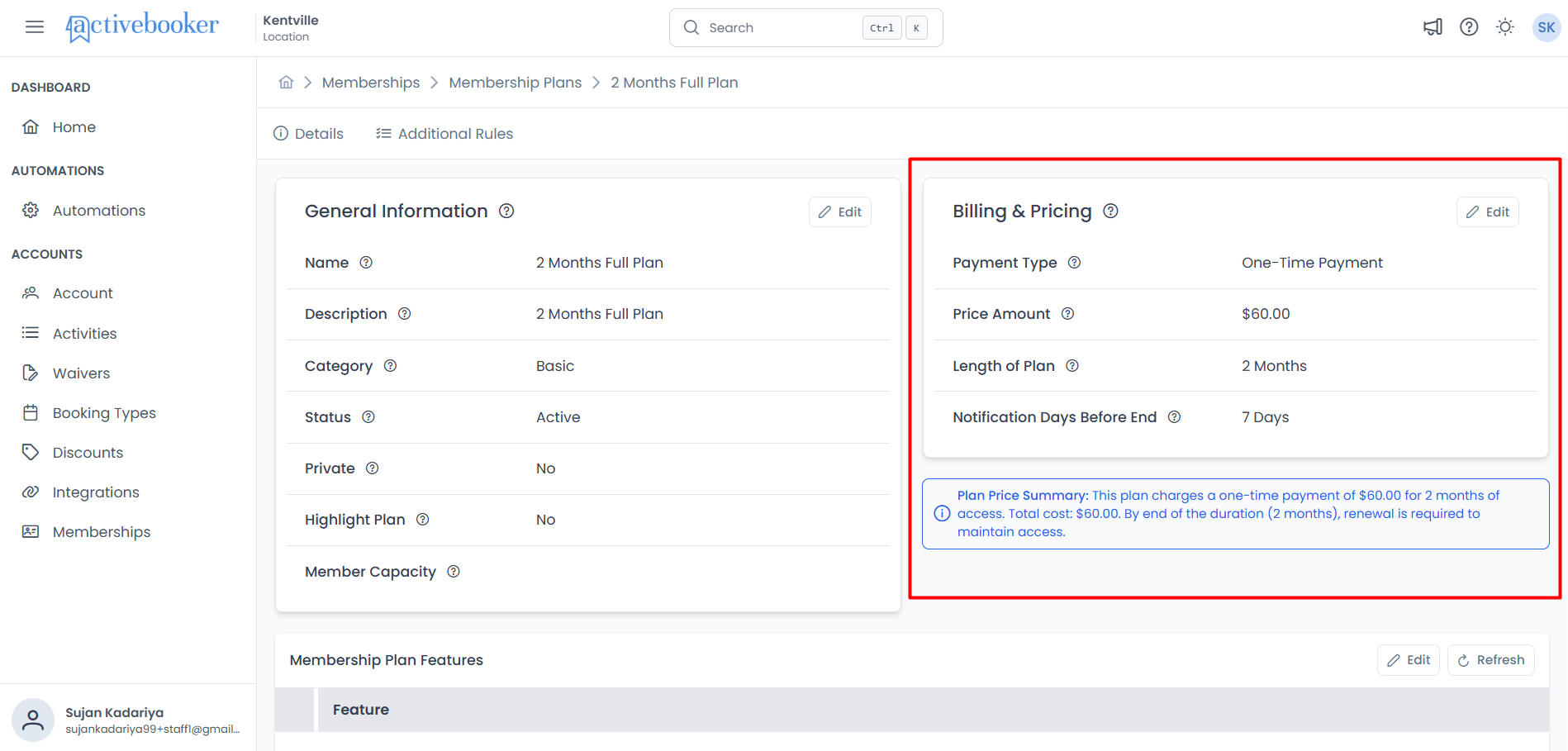
What Billing & Pricing Displays
The Billing & Pricing section shows the following details:
Payment Type
The payment structure for this membership plan. Shows either One-Time Payment or Monthly Recurring.
- One-Time Payment — Member pays the full amount upfront once at the time of subscription. The subscription remains active for the plan duration, then expires.
- Monthly Recurring — Member is charged automatically each month for the duration of the plan. For example, a 12-month plan with monthly recurring billing charges the member 12 times (once per month).
The payment type is set when you first create the plan and cannot be modified afterward. This protects existing members and maintains billing consistency.
Price Amount
The price members pay for this membership plan. Displays as a currency value (e.g., $59.99).
- For One-Time Payment: This is the total amount charged once at subscription
- For Monthly Recurring: This is the amount charged each month
Length of Plan
The total duration of the subscription from the purchase or renewal date. Displays in months (e.g., "12 Months").
After this period, the subscription expires unless the member renews. For monthly recurring plans, billing continues monthly until the full duration is complete.
Like payment type, the plan duration is set at creation and cannot be modified. This ensures subscription terms remain consistent.
Notification Days Before End
The number of days before the subscription expires that members receive a reminder notification. Displays as a number of days (e.g., "3 Days" or "7 Days").
This helps members prepare for renewal or plan expiration, reducing unexpected lapses in membership.
Plan Price Summary
A helpful summary displayed in an information box at the bottom of the section that explains the total cost to members in plain language.
Example summaries:
- One-Time Payment: "This plan charges $119.99 as a one-time payment for 12 months. Total cost: $119.99.By end of the duration (12 months), renewal is required to maintain access."
- Monthly Recurring: "This plan charges $59.99 per month with monthly recurring payment for 12 months. Total cost: $719.88. By end of the duration (12 months), renewal is required to maintain access."
Viewing billing & pricing
To see the billing and pricing configuration for a specific membership plan:
- Navigate to Memberships > Membership Plans
- Find the plan you want to view
- Click View Detail in the Actions column
- Observe the Billing & Pricing section on the Details tab
The section displays all pricing information, showing exactly what members will pay and how billing works for this plan.
Editing billing & pricing
Update your plan's pricing and notification settings to reflect changes in your business model or member communication needs.
How to edit billing & pricing
- Navigate to the plan's Details page
- Click the Edit button in the top-right corner of the Billing & Pricing section
- The "Edit Billing & Pricing" modal dialog opens
- Update the fields you can change (see field details below)
- Review the pricing summary at the bottom
- Click Save to apply your changes, or Cancel to discard them
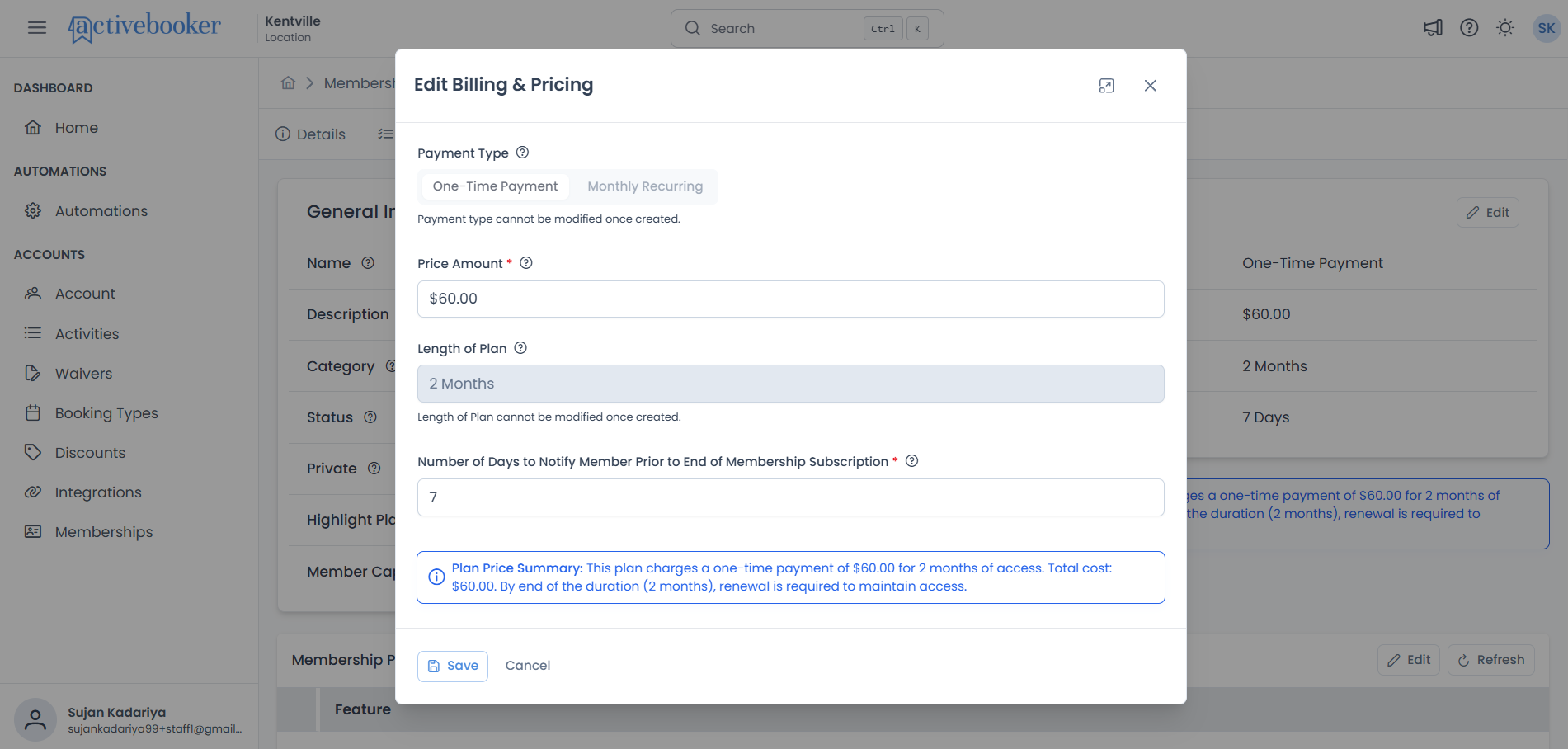
Only Price Amount and Notification Days Before End can be edited. Payment Type and Length of Plan are locked to protect existing member agreements.
Payment Type Field (Read-only)
Displays the payment structure configured when the plan was created.
- Display: Select button showing "One-Time Payment" or "Monthly Recurring"
- Status: Disabled (cannot be changed)
- Below field: "Payment type cannot be modified once created."
Why it's locked:
Changing payment type after members have subscribed would create billing confusion and legal complications. If you need a different payment structure, create a new plan instead.
Create two versions of the plan—one with One-Time Payment and one with Monthly Recurring—so customers can choose their preferred payment method.
Price Amount Field
The price members pay for the subscription.
- Format: Currency (dollars and cents)
For One-Time Payment plans:
This is the single upfront amount charged when a member subscribes.
For Monthly Recurring plans:
This is the amount charged each month throughout the subscription duration.
Example calculations:
One-Time Payment:
- Price: $119.99
- Duration: 12 months
- Member pays: $119.99 once (total cost: $119.99)
Monthly Recurring:
- Price: $59.99
- Duration: 12 months
- Member pays: $59.99 × 12 = $719.88 (charged as $59.99 per month)
When you change the price, it applies to members on their next billing cycle. Previous billing amounts are NOT adjusted or refunded. Communicate price changes to your members in advance to avoid confusion.
Price change warning behavior:
When you modify the price amount in the edit form, a yellow warning box appears below the field:
⚠️ Changes to the price will be applied to members on their next billing cycle. Previous billing amounts will not be affected. Please communicate this change to your members if necessary.
This reminder helps you consider the impact before saving.
- Test pricing carefully — Use inactive or private plans to test new price points before going public
- Grandfather existing members — Consider creating a new plan at the new price rather than changing existing plan prices
- Communicate changes early — Give members at least 30 days notice before price increases
- Round to familiar amounts — Prices like $49.99 or $50.00 feel more natural than $51.37
- Consider annual discounts — One-time payment plans can offer savings compared to monthly recurring
Length of Plan Field (Read-only)
Displays the plan duration in months.
- Display: Text field showing "N Month" or "N Months" (e.g., "12 Months")
- Status: Disabled (cannot be changed)
- Below field: "Length of Plan cannot be modified once created."
Examples:
- "1 Month" — 30-day subscription
- "3 Months" — Quarterly subscription
- "12 Months" — Annual subscription
Why it's locked:
The subscription duration is a core contract term. Changing it after members subscribe would alter their agreement. To offer a different duration, create a new plan.
- Duration (Length of Plan) = How long the subscription lasts total
- Billing Frequency (Payment Type) = How often members are charged
A plan can have a 12-month duration with monthly billing—meaning it lasts 12 months but bills monthly.
Notification Days Before End Field
The number of days before expiration that members receive a reminder notification.
How it works:
If you set this to 7 days, members receive a notification one week before their subscription expires. This gives them time to decide whether to renew or let the membership lapse.
Examples:
7-day notification (recommended):
- Subscription ends: March 31
- Member notified: March 24
- Use when: You want to give members a week to plan
14-day notification (maximum):
- Subscription ends: March 31
- Member notified: March 17
- Use when: Members need maximum advance planning time
Too short (1-2 days): Members may not see the notification in time to renew
Sweet spot (5-7 days): Gives members time to act without being too early
Too long (12-14 days): Members may forget by the time expiration arrives
Most businesses find 7 days works well.
What members receive:
The actual notification message and delivery method (email, SMS, in-app) are configured in your notification settings, not on the plan itself. This field only controls the timing.
Plan Price Summary
At the bottom of the edit form, an information box displays a plain-English summary of what members will pay.
The summary updates automatically as you change the price amount, showing calculations based on:
- The price you enter
- The payment type (fixed, cannot change)
- The plan duration (fixed, cannot change)
Example summaries you'll see:
For Monthly Recurring plan with 12-month duration at $59.99:
ℹ️ Plan Price Summary: This plan charges $59.99 per month with monthly recurring payment for 12 months. Total cost: $719.88. By end of the duration (12 months), renewal is required to maintain access.
For One-Time Payment plan with 12-month duration at $119.99:
ℹ️ Plan Price Summary: This plan charges $119.99 as a one-time payment for 12 months. Total cost: $119.99.
Why this is helpful:
The summary shows you exactly what members will see and pay, helping you verify pricing is correct before saving.
Before clicking Save, read the Plan Price Summary to confirm:
- The total cost matches your intentions
- Monthly vs. one-time is clear
- Duration and pricing make sense together
Pricing changes affect member billing. Review the Plan Price Summary and verify all amounts before clicking Save.
Understanding payment types in detail
The payment type fundamentally changes how members experience your membership and how revenue flows to your business.
One-Time Payment
How it works:
- Member pays the full amount once when they subscribe
- Subscription remains active for the full duration
- No additional charges occur during the subscription period
- Subscription expires at the end of the duration
- Member must manually renew if they want to continue
Revenue impact:
- You receive the full payment upfront
- Better cash flow for long-duration plans
- Easier for members to budget (one payment and done)
Best for:
- Annual memberships where upfront payment is expected
- Seasonal passes (e.g., summer season access)
- Fixed-term programs or classes
- Members who prefer to pay once and forget about it
- Plans where you want to secure revenue in advance
Example use cases:
Summer Pool Pass:
- Price: $249.99
- Duration: 3 months
- Member pays: $249.99 once
- Access: June, July, August pool entry
Monthly Recurring
How it works:
- Member pays the price amount each month
- Billing continues automatically each month
- Continues for the duration of the plan
- Subscription expires after the final monthly payment
- Member must renew to continue beyond the duration
Revenue impact:
- You receive steady monthly revenue
- Spreads member payment over time (easier for members to afford)
- Reduces up-front cost barrier
Best for:
- Members who prefer smaller monthly payments
- Plans where you want predictable monthly revenue
- Memberships where lower monthly cost increases sign-ups
- Longer-duration plans (6-12 months) that might be expensive upfront
Example use cases:
Monthly Fitness Membership (12-month commitment):
- Price: $59.99
- Duration: 12 months
- Member pays: $59.99 per month for 12 months (total: $719.88)
- Access: 12 months of gym access
Monthly Recurring ≠ 1-month duration. You can have:
- 12-month duration with monthly billing (pays monthly for 12 months)
- 6-month duration with monthly billing (pays monthly for 6 months)
- 3-month duration with monthly billing (pays monthly for 3 months)
The payment type controls HOW OFTEN they pay. The duration controls HOW LONG it lasts.
Choosing Between Payment Types
| Consider This | One-Time Payment | Monthly Recurring |
|---|---|---|
| Member affordability | Higher upfront cost may deter sign-ups | Lower monthly cost is easier to afford |
| Your cash flow | Immediate revenue, better for expenses | Steady monthly revenue, predictable |
| Member commitment | Feels like a bigger commitment | Feels easier to commit to |
| Pricing psychology | "$599/year" feels expensive | "$49.99/month" feels affordable |
| Administrative effort | Single transaction | 12 monthly transactions (more processing) |
| Refund complexity | Must prorate refunds if member cancels early | Simpler to cancel (stop future charges) |
| Revenue risk | Secured in advance | Member might cancel before full duration |
Many successful membership businesses create two versions of the same plan:
- "Annual Membership" — $599.99 one-time (saves $20)
- "Annual Membership (Monthly Billing)" — $51.99/month for 12 months
This lets members choose their preferred payment method while you get the benefits of both approaches.
After saving billing & pricing changes
Where changes appear:
- On the plan details page (immediately)
- In member billing schedules (next billing cycle)
- On the public member portal (immediately for new sign-ups)
Price changes do NOT retroactively adjust previous charges. Members who already paid are not refunded or charged additional amounts. New pricing applies starting with their next scheduled billing date.
Communicating price changes to members
When you increase the price of a plan, it's important to notify affected members before their next billing cycle:
Best practices for price change communication:
- Notify in advance — Give at least 30 days notice before the new price takes effect
- Explain the reason — "We're improving facilities" or "Rising operational costs"
- Highlight value — Remind members of the benefits they receive
- Be transparent — State the old price, new price, and effective date clearly
- Offer options — Let members cancel if they don't want the new price
- Grandfather if possible — Consider keeping current members at the old price
Sample communication:
Subject: Upcoming Membership Price Adjustment
Dear Member,
Starting May 1, 2026, the price of your Gold Plan membership will increase from $59.99 to $69.99 per month. This adjustment helps us continue providing exceptional facilities and services.
Your next billing date is May 15, 2026, when the new rate will apply.
If you have any questions, please contact us. We value your membership and appreciate your understanding.
Common scenarios
Increasing prices for an existing plan
Scenario: Your operating costs have increased and you need to raise the monthly membership price from $49.99 to $59.99.
Solution:
- Open the plan details page
- Click Edit in the Billing & Pricing section
- Change Price Amount from $49.99 to $59.99
- Review the warning about billing cycle impact
- Note the new total cost in the Plan Price Summary
- Click Save
- Draft communication to existing members about the price change
- Send notifications at least 30 days before their next billing date
Result: New sign-ups pay $59.99 immediately. Existing members pay $59.99 starting their next billing cycle after you save.
Offering early renewal notification
Scenario: Members complained they didn't have enough time to renew before their subscriptions expired. You want to give them 2 weeks notice instead of 3 days.
Solution:
- Open the plan details page
- Click Edit in the Billing & Pricing section
- Change Notification Days Before End from 3 to 14
- Click Save
Result: Future subscription expiration notifications go out 14 days in advance, giving members more time to decide about renewal.
Creating a discounted annual plan
Scenario: You have a monthly plan at $59.99/month and want to offer an annual plan that saves members money if they pay upfront.
Solution:
- Create a NEW plan (don't edit the existing monthly plan)
- Set Payment Type to One-Time Payment
- Set Price Amount to $599.99 (saves $120 compared to $59.99 × 12 = $719.88)
- Set Duration to 12 months
- Name it "Annual Gold Plan (Prepaid)" to differentiate from monthly version
Result: Members can choose between flexibility (monthly) or savings (annual prepaid).
Troubleshooting
Problem: Price warning appears when I don't want to change price
Symptoms: Yellow warning box shows even though you didn't intend to change the price
Solution:
- The warning appears whenever the price differs from the original
- If you accidentally changed it, adjust back to the original amount
- Even $59.98 vs. $59.99 triggers the warning—be precise
- Click Cancel and re-open to reset to original values
Problem: Changes not appearing in member billing
Symptoms: Updated price doesn't show in member billing
Solution:
- Price changes apply to the NEXT billing cycle, not retroactively
- Check the member's next billing date—changes take effect then
- If the member was already billed for the current cycle, they pay the old price
- New members see the new price immediately
Problem: Plan Price Summary shows wrong calculation
Symptoms: The summary displays an unexpected total
Solution:
- This is rare—the summary is calculated automatically
- Double-check the price amount you entered
- Verify payment type (One-Time vs. Monthly Recurring)
- Remember monthly recurring multiplies price by duration in months
- Refresh the page and try again if the calculation seems stuck
Best practices
Pricing strategy
✅ Research competitor pricing — Know what similar memberships cost in your area
✅ Test different price points — Use private/inactive plans to experiment
✅ Price based on value — Consider what members receive, not just your costs
✅ Offer multiple options — Have basic, mid-tier, and premium price points
✅ Round to psychological prices — $49.99 often performs better than $51.37
✅ Consider annual discounts — Reward members who pay upfront
❌ Don't undervalue your service — Low prices can signal low quality
❌ Don't change prices too frequently — Members need stability
Payment type selection
✅ Monthly recurring for accessibility — Lower monthly payments attract more members
✅ One-time for commitment — Upfront payment ensures member dedication
✅ Offer both when possible — Let members choose their preferred method
✅ Match to membership type — Short-term plans suit one-time; long-term suits recurring
❌ Don't use one-time for very long durations — $3,000 upfront for 24 months is a barrier
❌ Don't forget administrative costs — Monthly billing creates more processing
Notification timing
✅ 7 days is the sweet spot — Gives notice without being too early
✅ Longer for complex renewals — If members need to gather information or decide
✅ Shorter for simple auto-renewals — 3-5 days if most members auto-renew
✅ Test and adjust — Monitor renewal rates and adjust notification timing
❌ Don't go too short — 1-2 days doesn't give members time to act
❌ Don't go too long — 14 days and members may forget by expiration
Price change management
✅ Communicate early and often — 30-60 days notice for price increases
✅ Explain the reasons — Help members understand why prices are changing
✅ Grandfather loyal members — Consider keeping long-term members at old prices
✅ Phase in gradually — Small increases ($5) are easier to accept than large ones ($20)
✅ Time it right — Don't raise prices during slow seasons
❌ Don't surprise members — Unexpected price changes damage trust
❌ Don't raise prices without added value — Show what members gain for the higher price
Related documentation
- 📚 Membership Plans Overview — Complete guide to membership plans
- 📋 Plan Details - General Information — Configure plan name, description, and visibility
- ✨ Plan Features — Add and manage plan benefits and highlights
- 👥 Members — Manage member accounts and subscriptions