Bookings report
See how many bookings you're taking, when they happen, which channel they come through, and which booking types are most popular.
Open the report
- Click Reports in the left sidebar
- Open the Bookings Report card
- Pick a date range with the date range picker in the top-right corner
- Click Refresh anytime to reload the latest data for the same date range
Choosing a date range
Every card and chart on this page only shows data from the date range you select. You can pick a quick preset (1 Day, 1 Week, 1 Month) or set a custom start and end date.
Whatever range you pick, the report also compares it against the period right before it, so the KPI cards can show whether booking volume is trending up or down:
| Selected range | Compared against |
|---|---|
| 1 Day | The single day before it |
| 1 Week | The 7 days before it |
| 1 Month | The previous calendar month |
| Custom range | The same number of days immediately before your range |
Example: If you select 06/01/2026 – 06/07/2026 (7 days), the report compares your totals against 05/25/2026 – 05/31/2026 (the 7 days right before). If your selected range crosses a month or year boundary, the report still adds everything up correctly — nothing is dropped or duplicated at the boundary.
KPI cards
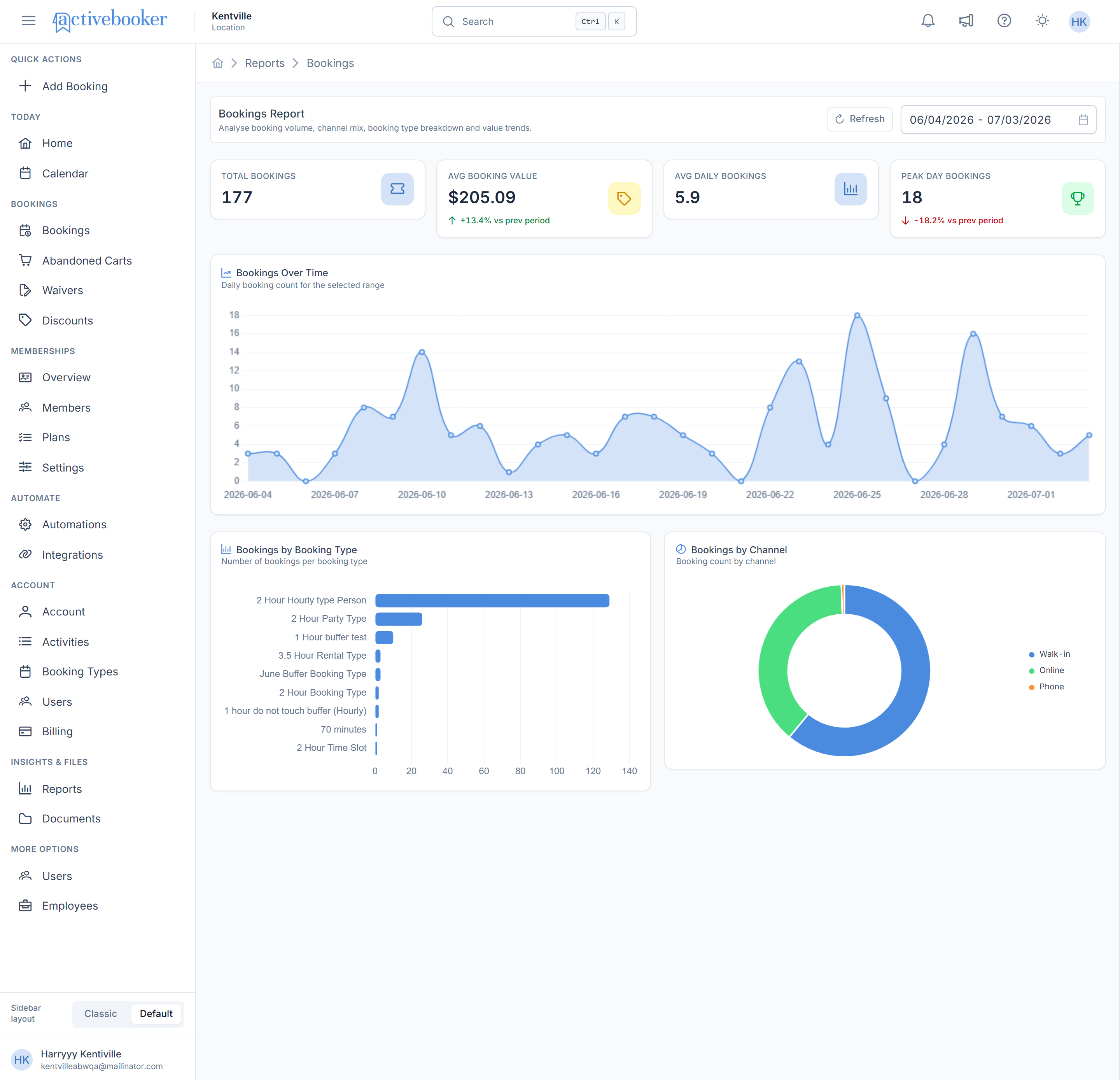
Four summary cards sit at the top of the report. Each one shows a value plus a trend badge — a green arrow up when the value increased versus the previous period, or a red arrow down when it decreased.
| Card | What it shows | How it's calculated |
|---|---|---|
| Total Bookings | The number of bookings made in the selected range | Count of every booking in the range |
| Avg Booking Value | The average amount collected per booking | Total revenue from those bookings ÷ number of bookings |
| Avg Daily Bookings | Bookings per day, averaged across the range | Total Bookings ÷ number of days in the range |
| Peak Day Bookings | The single busiest day in the range | The day with the highest booking count |
Example
For the range 05/28/2026 – 06/26/2026, the cards might read:
- Total Bookings: 153, with a green +81.7% vs prev period badge (bookings grew compared to the prior 30 days)
- Avg Booking Value: $231.36 — the average revenue each booking brought in
- Avg Daily Bookings: 5.1 — the daily average across all 30 days
- Peak Day Bookings: 18 — the single busiest day in that range
If a card's value falls compared to the previous period, it shows a red badge instead, such as -26.4% vs prev period.
When there are no bookings at all in the selected range, Total Bookings, Avg Daily Bookings, and Peak Day Bookings all show 0, and Avg Booking Value shows $0 — this is expected, not an error.
Charts
Bookings Over Time
What it shows: A filled area chart plotting the number of bookings per day across your selected range, so you can spot busy and quiet stretches.
How it works: Each day in the range gets a single point equal to how many bookings started that day. Days with no bookings still show a point at 0 rather than a gap.
Example: Hovering over the point for 2026-06-23 shows a tooltip with that date and the booking count, for example 13.
Bookings by Booking Type
What it shows: A horizontal bar chart ranking your booking types by how many times each was booked during the selected range.
How it works: Every booking is added to the count for its booking type. The bars are sorted from highest to lowest, so the type at the top is your most-booked offering.
Example: If "2 Hour Hourly type Person" was booked 250 times and "Overnight Booking Type" was booked 15 times over the same range, the first bar will be far longer — showing which offering customers choose most. Compare this with the Revenue report to see which offerings are popular but low-value, or rare but high-value.
Bookings by Channel
What it shows: A donut chart splitting your bookings by how they were made: Walk-in (created in the dashboard), Online (booked through your booking page), and Phone.
How it works: Each booking is attributed to whichever channel it was created through, then counted per channel. The legend shows the color for each channel and its share of total bookings.
Example: A donut that's almost entirely blue tells you nearly all of your bookings are Walk-in, with only a small slice coming from Online or Phone.
Peak Hours
What it shows: A bar chart of booking activity by hour of day, across 24 one-hour ranges (12-1a, 1-2a, ... through 11p-12a), so you can see which hours are busiest.
How it works: Every booking is counted in the hour range(s) it's active during. If a booking spans multiple hours — say a 3-hour rental from 2pm to 5pm — it's counted once in every hour it touches, so the 2-3p, 3-4p, and 4-5p bars each get a count for that one booking. The chart subtitle always calls out the busiest hour and how many active bookings it had, and the bar for that hour is highlighted.
Example: A subtitle reading "Busiest hour: 8-9a (68 active)" means 68 bookings were active during the 8-9am hour across the selected range — more than any other hour — and that bar is highlighted darker than the rest. Hovering any bar shows a tooltip with the exact hour range and active booking count.
Bookings by Day of Week
What it shows: A bar chart totalling bookings by day of the week (Sunday through Saturday), so you can see which weekdays are busiest.
How it works: Every day in your selected range is grouped by its weekday name, and all the bookings from matching days are added together. For example, if your range includes four Tuesdays, the Tuesday bar is the sum of bookings from all four of those Tuesdays.
Example: If Tuesdays consistently have more bookings than other days, the Tuesday bar will clearly stand taller than the rest — a sign you might want extra staff scheduled that day. Hovering a bar shows the day name and its exact booking count.
Related
- Revenue report — the money side of the same data
- Calendar — see the bookings behind a busy day