Memberships report
Monitor the health of your membership program — new sign-ups, renewals, expirations, cancellations, and the revenue memberships bring in.
This report requires the membership feature to be enabled on your subscription. If you don't see it under Reports, your plan doesn't include memberships — contact support to add it. You also need a Staff or Admin role to view Reports.
Open the report
- Click Reports in the left sidebar
- Open the Memberships Report card
- Pick a date range with the date range picker in the top-right corner
- Click Refresh anytime to reload the latest data for the same date range
Choosing a date range
The KPI cards, Revenue Over Time chart, and Subscriptions Over Time chart only include activity from the date range you select. You can pick a quick preset (1 Day, 1 Week, 1 Month) or set a custom start and end date.
Whatever range you pick, the report also compares it against the period right before it, so the KPI cards can show whether things are trending up or down:
| Selected range | Compared against |
|---|---|
| 1 Day | The single day before it |
| 1 Week | The 7 days before it |
| 1 Month | The previous calendar month |
| Custom range | The same number of days immediately before your range |
Example: If you select 06/01/2026 – 06/07/2026 (7 days), the report compares your totals against 05/25/2026 – 05/31/2026 (the 7 days right before).
The Members by Current Plan and Members by Subscription Status charts are the exception — they always reflect every member's current state, not just activity inside your selected date range. See those charts below for details.
KPI cards
Four summary cards sit at the top of the report. Each one shows a value plus a trend badge — a green arrow up when the value increased versus the previous period, or a red arrow down when it decreased.
| Card | What it shows | How it's calculated |
|---|---|---|
| Membership Revenue | Total membership revenue collected in the range | Sum of all membership payments in the range |
| New / Renewed | Subscriptions started or renewed in the range | Count of new sign-ups plus renewals |
| Expired | Subscriptions that lapsed in the range | Count of subscriptions whose end date fell inside the range without being renewed |
| Cancelled | Subscriptions manually cancelled in the range | Count of subscriptions a staff member or member cancelled during the range |
Example
For the range 05/28/2026 – 06/26/2026, the cards might read:
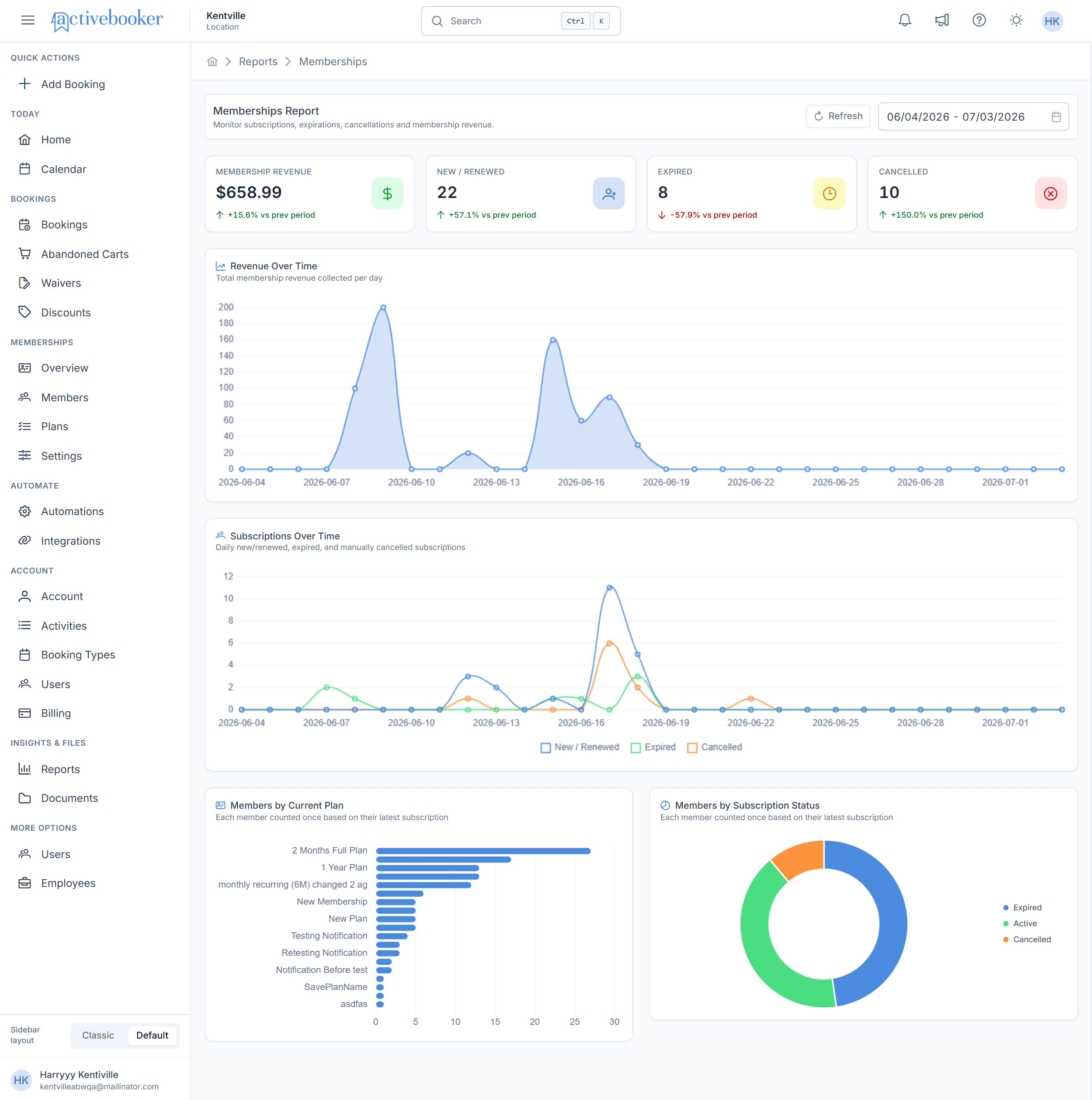
- Membership Revenue: $658.99, with a green +15.6% vs prev period badge
- New / Renewed: 22 subscriptions
- Expired: 8 subscriptions, shown with a red -57.9% vs prev period badge if that's a drop from the prior period
- Cancelled: 10 subscriptions, with a badge that can even read +100.0% if cancellations doubled compared to the previous period — that's a valid, expected value
When there's no membership activity at all in the selected range, Membership Revenue shows $0 and the other three cards show 0 — this is expected, not an error.
Charts
Revenue Over Time
What it shows: A filled area chart plotting total membership revenue collected per day across your selected range.
How it works: Each day in the range gets a single point equal to all membership payments collected that day. Days with no membership revenue still show a point at $0 rather than a gap, so sudden spikes (like a batch of renewals) stand out clearly.
Example: Hovering over the point for 2026-06-15 shows a tooltip with that date and the revenue collected, for example $160.
Subscriptions Over Time
What it shows: A multi-line chart with three separate lines — New / Renewed, Expired, and Cancelled — plotted per day, so you can see growth and churn side by side.
How it works: Each day in the range gets one count per line: how many subscriptions were newly started or renewed that day, how many expired that day, and how many were manually cancelled that day. The legend below the chart shows which color belongs to which line.
Example: If the New/Renewed line rises sharply near the end of the month while Expired and Cancelled stay low, that's a sign of a successful renewal push with little churn during that period.
Members by Current Plan
What it shows: A horizontal bar chart of how many members currently hold each of your membership plans.
How it works: Every member is counted exactly once, based on their most recent subscription — regardless of the date range you have selected. This chart answers "how are my members distributed across plans right now", not "who joined a plan during this date range".
Example: If your "1 Year Plan" bar is much longer than your "New Plan" bar, most of your active membership base is on the annual plan rather than the newer option.
Members by Subscription Status
What it shows: A donut chart splitting all members by their current subscription status: Active, Expired, or Cancelled.
How it works: Just like Members by Current Plan, each member is counted once based on their latest subscription's status — this is a current snapshot, not limited to your selected date range.
Example: A donut that's mostly one color with two smaller slices tells you at a glance what share of your membership base is currently active versus lapsed or cancelled.
Related
- Members list — the individual members behind these numbers
- Membership plans — configure the plans this report measures