Announcements & updates
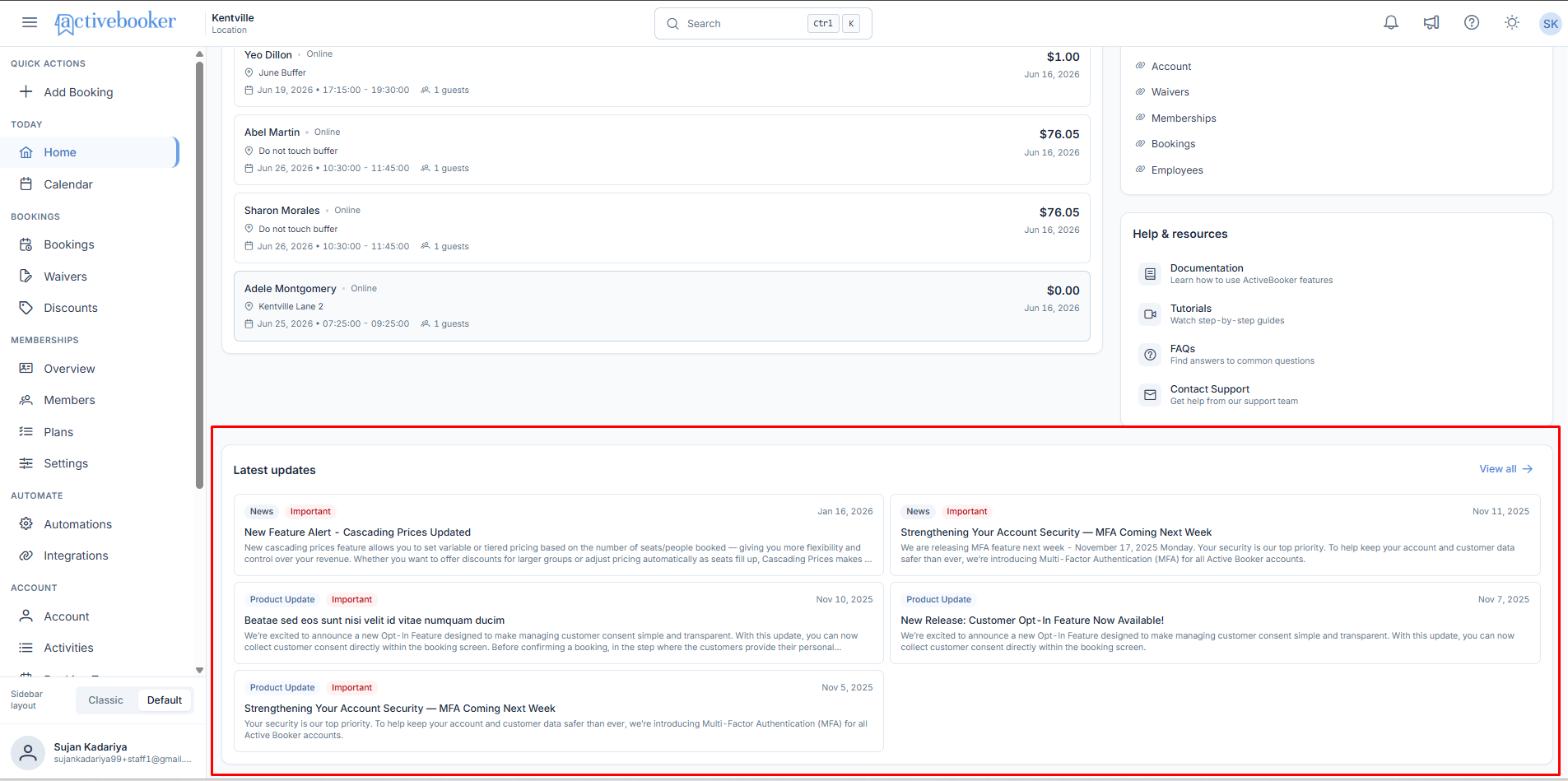
The Latest Updates panel on your Dashboard Home keeps you informed about new features, improvements, and important system information as soon as you log in.
Quick start
- Log in and check the Latest updates panel at the bottom of the Dashboard Home
- Click any announcement card to read the full details
- Click the announcements icon (megaphone) in the top navigation bar to browse the complete history in the Announcements Drawer
What you can do
Announcements & updates help you:
- Stay current at a glance — See the five most recent announcements every time you log in, without seeking them out
- Catch important changes early — Announcements flagged Important stand out with a red indicator
- Browse the full history — The Announcements Drawer keeps every past announcement, not just the latest five
- Filter by topic — Tags such as Calendar, Email, or Reporting show what each announcement covers
Where to find announcements
You can view announcements in two places:
On your Dashboard Home The Latest updates panel shows the five most recent announcements — a quick glance at what's new each time you log in.
In the Announcements Drawer Click the announcements icon in the top navigation bar to see all announcements, including older ones. The drawer slides in from the right side of your screen and lets you browse the complete history.
Types of announcements
Product updates let you know about new features or improvements to existing ones — for example, when we redesign the booking calendar or add a new reporting tool.
News covers more general information like scheduled maintenance, quarterly summaries, or system status updates.
Important announcements
Some announcements are flagged Important with a red indicator. These typically involve:
- Scheduled maintenance that might cause brief downtime
- Security updates that affect your account
- Changes to features you're currently using
- Unexpected service issues we're working to resolve
If there's a scheduled maintenance announcement, note the date and avoid scheduling important bookings during that window.
Reading announcements
Each announcement card shows the type (Product Update or News), title, a brief summary, and the date it was published.
- From the Dashboard Home, click an announcement to see the complete information
- In the Announcements Drawer, click any item to expand it, then use the back button to return to the list
Best practices
✓ Check Latest Updates on login — Especially useful after a few days away, so you don't miss a change that affects your workflow
✓ Try new features when announced — Most are built from customer feedback, so they're likely useful for your business
✗ Don't rely only on the Dashboard Home — It only shows the five most recent items; use the Announcements Drawer to find anything older
Related
- Dashboard Home — every widget on the home page, including Latest Updates
- Help & Resources — documentation, tutorials, and support contact