Cancel or refund a registration
Cancelling frees the place. Refunding sends money back. They are separate actions, and which one you use depends on what you owe the customer.
Before you start
- Both actions need the same access as managing your other settings.
- Both are final. There is no undo, and a cancelled registration cannot be reinstated — the customer registers again.
- The customer and the venue are emailed whenever either happens.
Which one you want
| Situation | What to do |
|---|---|
| A free league, or the customer never paid | Cancel |
| They paid, and you are giving all of it back | Refund the full amount — the registration is cancelled for you |
| They paid, and you are keeping a part of it | Refund the part you are returning — they keep their place |
| They paid, and you are keeping all of it | Cancel — the place is released and no money moves |
Cancelling a registration
- Open the league, go to Registrations, and find the person.
- Click Cancel at the end of their row.
- Read the confirmation, then click Confirm.
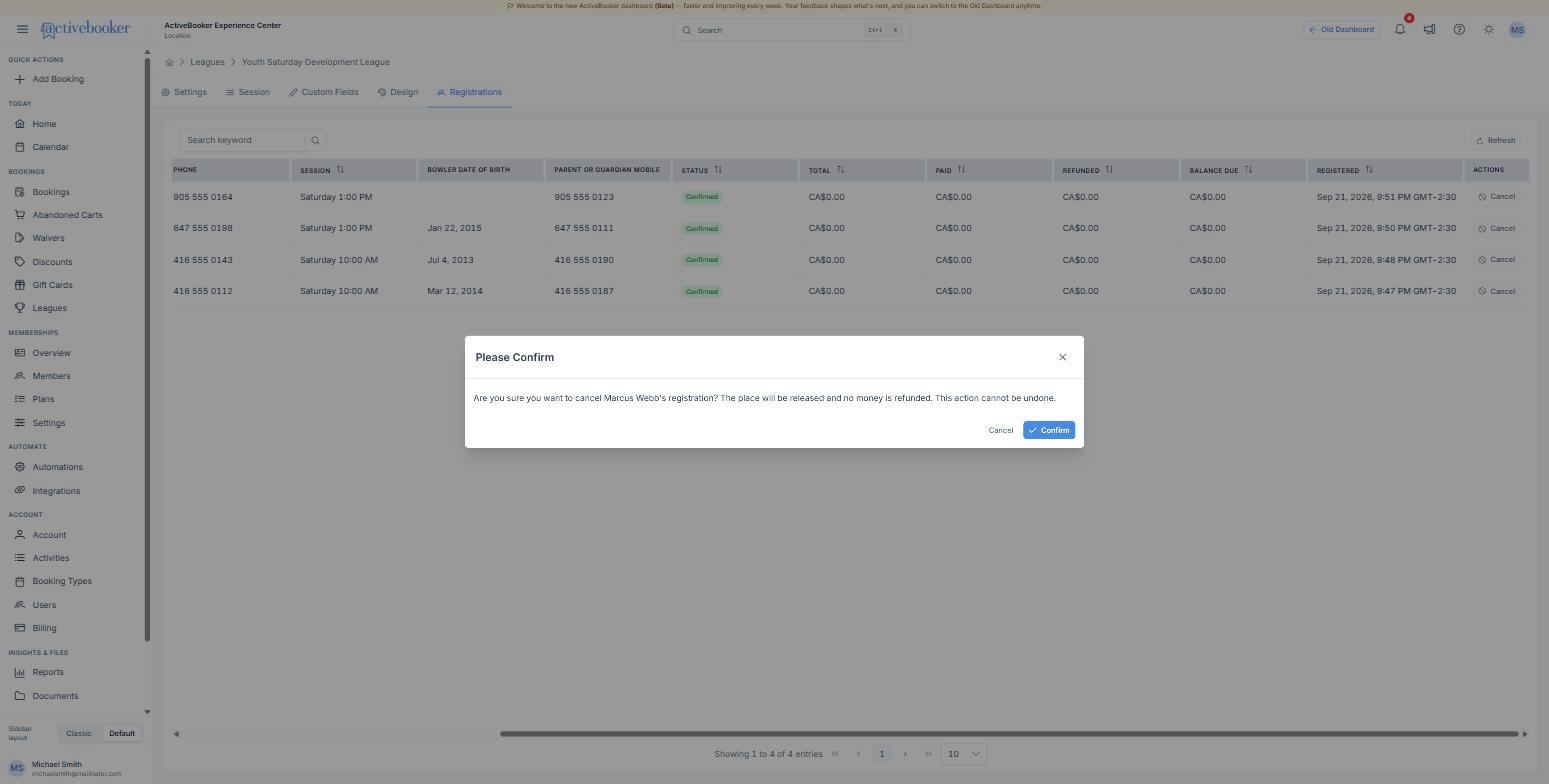
The dialog names the person so you cannot cancel the wrong row by reflex. Once confirmed:
- their Status becomes Cancelled
- the place goes back to the option, so the next person can take it
- their Balance Due drops to zero — a cancelled registration owes nothing
- no money is refunded, and the row stays on the roster as a record
The row keeps its reference and its answers. That is deliberate: you can still see who was in the league and when they left it.
Refunding a registration
The Refund action appears on registrations where money has been taken. Enter the amount you are sending back — the whole thing, or a part of it.
A full refund cancels the registration. Everything paid goes back, the place is released, and the status becomes Cancelled. Use it when someone drops out before the season starts.
A partial refund keeps the place. The customer stays on the roster as Confirmed, and the Refunded column shows what you returned. Use it when someone joins late and pays for the weeks they will play, or when you are returning a shirt fee but they are still bowling.
You can refund more than once, as long as the total stays within what was paid. The Refunded column is the running total and the Balance Due column shows what is left.
Money goes back the way it came in, to the card that was used at registration. Card networks take a few business days to show it on a statement — tell the customer to expect it within five business days rather than the same day.
A refund cannot be reversed from the dashboard. Check the amount before you confirm it — if you send back too much, you have to take the difference at the desk.
What the customer gets
| Action | What lands in their inbox |
|---|---|
| Registration | Registration Confirmed — <league name>, with their reference and answers |
| Cancellation | Registration Cancelled — <league name>, confirming the place has been released |
| Refund | A refund confirmation naming the amount that was sent back |
Your venue gets a copy of each one at the address your booking notifications go to, and the same events appear in the dashboard notification bell.
Best practices
✓ Write your drop-out rule into the league description. "Full refund up to one week before week one, half after that" settles almost every conversation before it starts. ✓ Refund first, then let them re-register when somebody is moving to another night in a paid league. ✓ Cancel no-shows before week two. The place goes back into the pool while there is still a season left to sell.
✗ Don't delete a league to clear its registrations. Deleting takes the roster and its payment history with it. ✗ Don't refund outside ActiveBooker. A refund taken on the card terminal does not reach the roster, and your numbers stop matching.
Troubleshooting
The Refund action is not there
Why this happens: Nothing was taken for that registration — a free league, or a payment that never completed. How to fix it: Use Cancel instead. Check the Paid column: if it is zero, there is nothing to refund.
The refund was refused
Why this happens: The amount is larger than what is left to refund, or the payment provider declined it. How to fix it: Check the Refunded and Paid columns and try the remaining amount. If the provider refused it, the payment may be too old to reverse — return the money at the desk and note the reference.
A customer says they were charged twice
Why this happens: They submitted the form twice, usually after a slow network. How to fix it: Search their email on the Registrations tab. If there are two confirmed rows, refund one in full — it cancels that registration and leaves the other in place.
Related
- Manage registrations — the columns these actions change
- What customers see — the receipt and the emails
- Create a league — where the fee and tax are set